Guides ·
Cursor vs GitHub Copilot after The X Subscription: which one makes sense now
Cursor now comes bundled with Grok and X. What the $8 Plus and $30 Premium plans include, how Copilot credits work, and where the hidden costs sit.
A year ago this was an easy call. Cursor cost $20 a month, Copilot cost $10. If you wanted the slicker AI editor you paid for Cursor, and if you wanted something cheap that lived inside the tools you already used, you took Copilot. That comparison no longer holds. Cursor isn't sold on its own to new customers anymore; it's now part of a bundle called The X Subscription, alongside Grok, Grok Bot and X Premium. Copilot, meanwhile, switched in June from counting requests to a credit system pegged to dollars. Most "Cursor vs Copilot" posts written before the summer describe plans that don't exist.
Below we put the late-October 2026 plans side by side. Which one is cheaper depends almost entirely on which models you want and which editor you live in, so here's the short answer first and the reasoning after.
If you only have a minute
Working in JetBrains, Visual Studio or Xcode and not planning to move? Copilot. There isn't much to argue about, because Cursor wants you in its own editor.
Want to hop between Claude, GPT and Gemini without thinking about a separate bill for each? Copilot Pro again. It's $10 a month and comes with $15 worth of usage that isn't tied to one vendor's models.
Already on VS Code, happy to code with Grok models, and paying for an X checkmark or a Grok subscription anyway? Then Cursor's $8 Plus plan is a surprisingly good deal. It has real limits, though, and we go through them one by one below.
What actually changed on the Cursor side
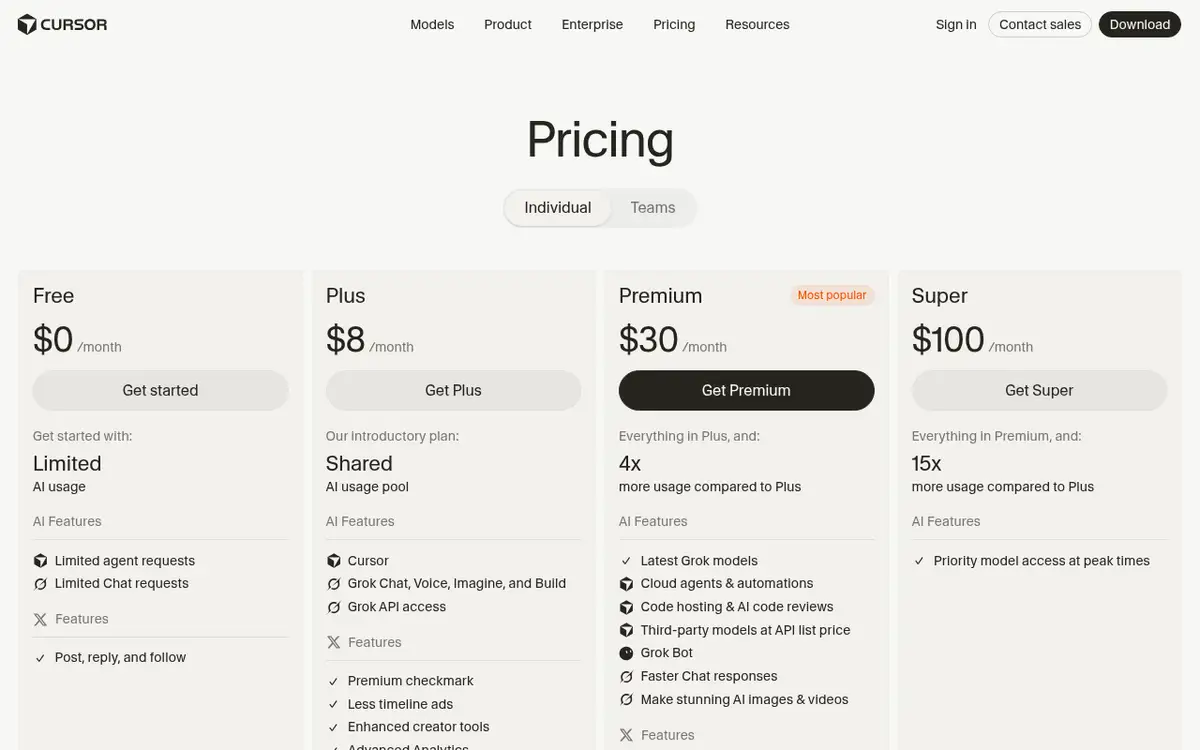
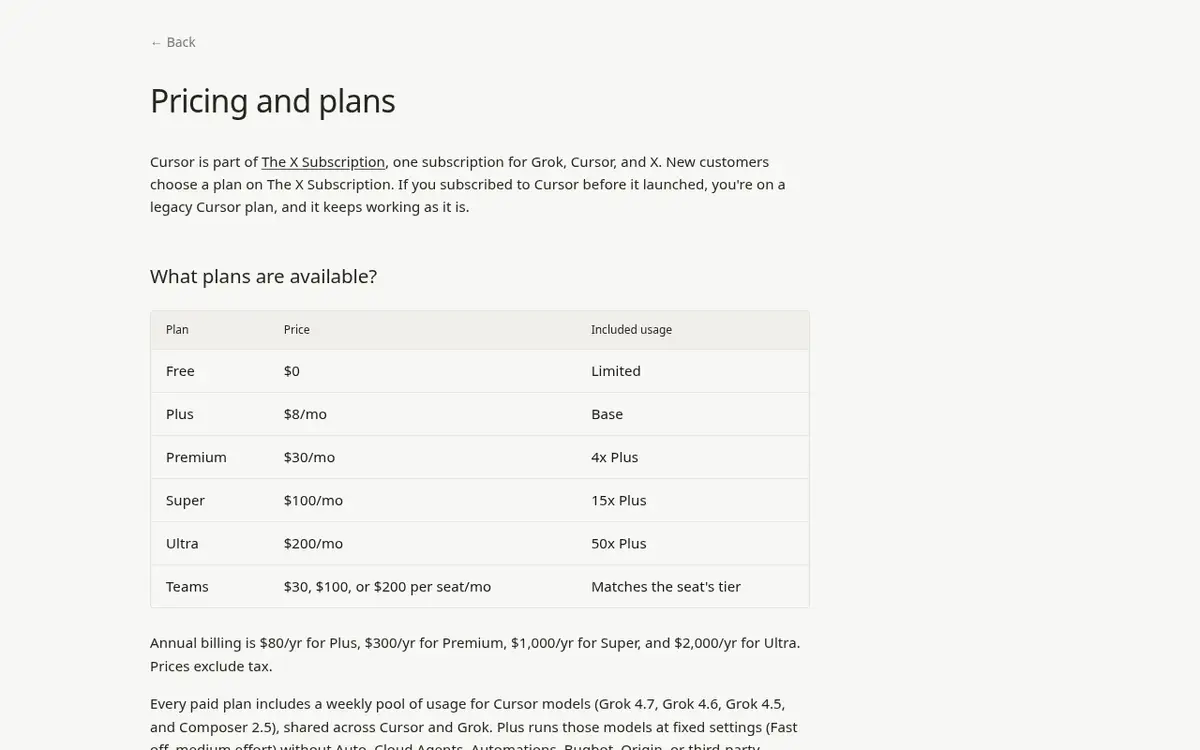
Cursor's help center spells it out: new customers pick a plan on The X Subscription. There are four paid tiers. Plus is $8 a month, Premium $30, Super $100 and Ultra $200. Paid yearly, Plus is $80 and Premium $300. Tax is extra.
Plus looks like "Cursor Pro at less than half price", and it isn't. According to the docs, Plus only gives you Cursor's own models (Grok 4.7, Grok 4.6, Grok 4.5 and Composer 2.5) at fixed settings: Fast mode off, medium effort. No Auto, no Cloud Agents, no Automations, no Bugbot code review, no third-party models like Claude or GPT, and no bringing your own API key. What you get in return is Grok chat, voice and image generation, Grok API access, and the Premium checkmark on X.
Premium is pitched as the successor to the old Cursor Pro. It gives you four times the Plus usage and unlocks Cloud Agents, Automations, code hosting on Origin, Bugbot and Grok Bot. Third-party models come with Premium too, with a catch. They aren't part of the usage pool you're paying for. They're billed at API list price from the first request, out of prepaid credit you top up separately.
That's the detail anyone who uses Cursor for Claude needs to know. You pay $30, and every token you send to Claude Sonnet 5.5 is billed on top. Cursor's model page lists Sonnet 5.5 at $2 per million input tokens and $10 per million output tokens. Individual plans don't pay Cursor's extra per-token fee; that one applies to Teams and Enterprise.
How Copilot's credits work
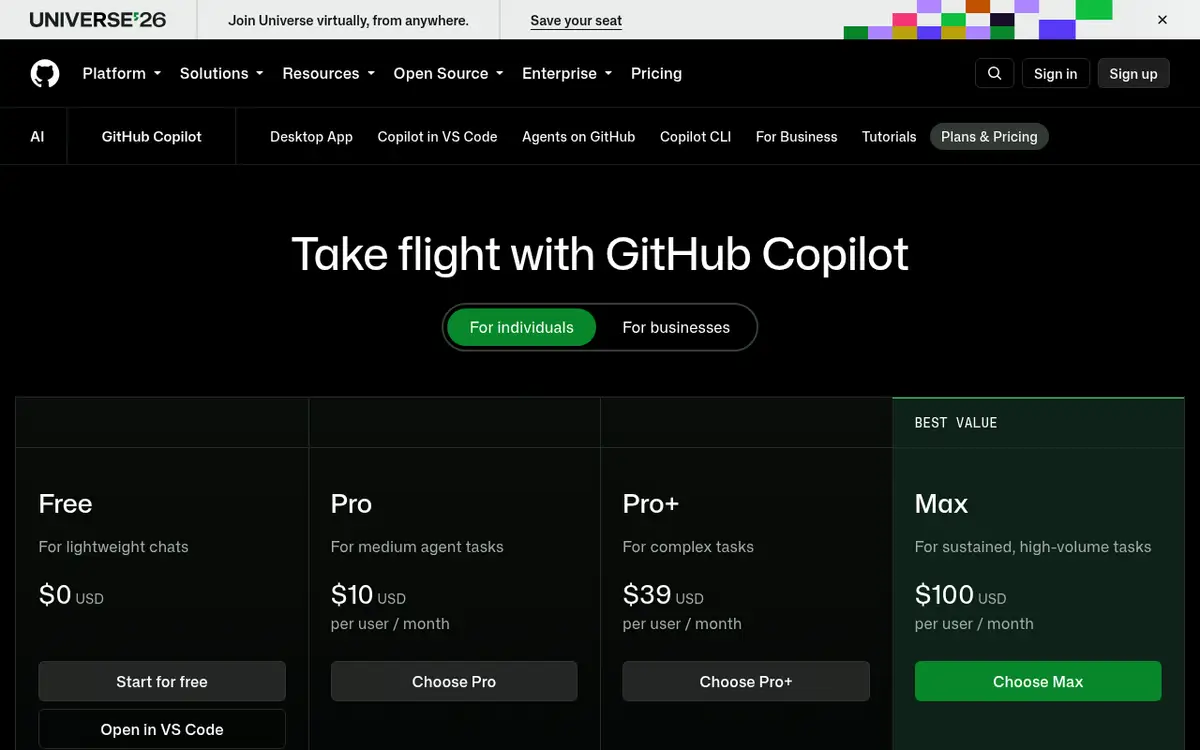
GitHub's setup is more straightforward. Each paid plan has base credits that match what you pay, plus a "flex allotment" on top. Pro costs $10 a month and includes 1,000 base credits and 500 flex credits, 1,500 in total. One credit is $0.01, so that's $15 of usage. Pro+ is $39 with 7,000 credits in total, and Max is $100 with 20,000.
GitHub is upfront that the flex part can change. Base credits stay fixed, the flex allotment moves with model prices and efficiency. You get $15 of usage for $10 today, with no promise that it stays that way.
Credits are spent on chat, agent mode, the CLI, the cloud agent and code review. Inline completions and next edit suggestions don't use credits and are unlimited on paid plans. If most of your day is pressing Tab, Copilot is cheap; the real cost shows up when you hand long jobs to the agent. The Free plan gives you 2,000 completions a month plus limited chat and agent use, with the model picked for you automatically.
One small thing worth knowing: on paid plans, letting Copilot choose the model automatically knocks 10% off model costs. When you run out, you can wait for the next month, set a dollar budget and keep going, or upgrade and pay only the difference between the two plans.
| Cursor (The X Subscription) | GitHub Copilot | |
|---|---|---|
| Free plan | Yes, limited agent and chat, Cursor models only | Yes, 2,000 completions a month, limited chat and agent |
| Cheapest paid plan | Plus, $8/month (Grok and Composer only) | Pro, $10/month (1,500 credits in total) |
| Claude, GPT, Gemini | Premium and up, billed separately at API list price | Paid plans, drawn from your credits |
| Allowance resets | Weekly | Monthly, on the 1st |
| Where it runs | Cursor's own editor, CLI | VS Code, Visual Studio, JetBrains, Xcode, Neovim, Eclipse, Zed |
| Also in the bundle | Grok, X Premium features | PR review and cloud agent on GitHub |
As of late October 2026, excluding tax.
The shared pool nobody mentions
The usage pool on The X Subscription isn't Cursor's alone. Per the docs, Grok chat, image generation in Imagine, voice mode, Grok Bot and the agent in Cursor all draw from the same weekly pool, at different rates depending on the product.
In practice that means twenty images in Grok on Sunday evening can leave less room for the agent on Monday morning. Someone who subscribed for coding and also plays around in Grok may hit the limit sooner than expected and wonder why. You can watch both in one place, under Usage at grok.com/dashboard.
The weekly reset has an upside. Burn through your allowance in one heavy day and you lose a few days at most, not the rest of the month. Copilot's credits reset on the 1st of every month at 00:00 UTC regardless of your billing date, and unused credits don't roll over. Run dry on the 25th and you're waiting about a week.
The editor matters more than the price
Cursor isn't a plugin. It's a separate editor built on VS Code. Coming from VS Code, switching takes minutes, and most of your settings and extensions come along. Coming from IntelliJ, PyCharm, Rider or Visual Studio, it means leaving your setup behind. Cursor has a CLI and an agents window, but nothing that sits natively inside a JetBrains IDE.
Copilot goes almost everywhere. GitHub lists VS Code, Visual Studio, the JetBrains IDEs, Xcode, Neovim, Eclipse, Zed and SQL Server Management Studio, plus Copilot CLI in the terminal, github.com and the mobile app. If your code is on GitHub you can assign an issue to Copilot and get a pull request back. Teams on GitLab or a self-hosted server get less out of that.
Where Cursor shines is that the whole editor was designed around AI from day one. Multi-file edits, reviewing the agent's changes file by file, chatting with your codebase: the flow feels more joined up. Copilot has narrowed the gap a lot with agent mode and the cloud agent. In our view, that cohesion is still the main reason to pick Cursor, more than the price.
Prompting in a language other than English
GitHub says it in its own FAQ: because most public code and docs are in English, Copilot will likely work less well with prompts that aren't in English or aren't grammatical. That's true of most coding models, not just Copilot. If you write prompts in Spanish, German or anything else and feel the tool isn't quite getting it, that may be why. Keeping identifiers, error messages and technical terms in English while writing the request in your own language usually works well in both tools.
Is your code used for training?
The two tools ship with different defaults here. GitHub says it may use Copilot interaction data from individual Free, Pro and Pro+ users, meaning prompts, suggestions and code snippets, to train models. You can turn that off at github.com/settings/copilot/features, and doing so doesn't remove any features. If you freelance on client code, flip that switch first.
Cursor has Privacy Mode. With it on, Cursor guarantees your code isn't used for training by Cursor or its model providers. It's a setting too. Whichever tool you choose, check it yourself rather than trusting the default.
Skip the cheap resold accounts
Shared or "half-price" AI accounts look tempting, especially when your currency is weak against the dollar. Cursor is clear about this: subscriptions are sold only directly by X Subscription Corp., there are no authorized resellers, and accounts bought elsewhere can be suspended at any time. You'd also be trusting your code to an account someone else controls. A few dollars a month isn't worth that.
Students have a better route. GitHub's docs mention a Copilot Student plan with unlimited code completions; check GitHub Education to see whether you qualify. For a broader list, see our guide to AI tools for students.
On an old Cursor Pro plan? Should you switch?
You don't have to. Cursor says legacy plans keep their price and features. The old $20 Pro maps to the $30 Premium. If you switch, your old subscription is cancelled with a prorated refund, and the move is permanent.
The deciding factor is which models you use. Legacy plans have two monthly pools, one for Cursor models and one for other models, so part of your Claude or GPT use is covered by what you already pay. The new Premium includes nothing for third-party models; every token is extra. If you spend your days with Claude, staying on legacy Pro is probably cheaper. If you mostly use Composer or Grok and you pay for X Premium anyway, switching can make sense; the X Subscription announcement says each new tier gives more usage per dollar than the plan it replaces.
Who should pick which
Coding as a hobby or while learning: start with both free plans. Copilot Free's 2,000 completions cover a small project most months, and Cursor's free tier lets you try the agent. Pay only after a month with both.
Freelance web developer, happy in VS Code: the real question is whether Grok models are good enough for you. If they are, Cursor Plus at $8 is a strong package. If you can't work without Claude or GPT, Copilot Pro is more predictable. Cursor Premium plus pay-as-you-go API usage can overtake the price of Copilot Pro+ with a handful of long agent sessions a month.
On a JetBrains IDE, Visual Studio or Xcode: Copilot. Code on GitHub and want AI pull request reviews too: Copilot again.
Already using Grok every day and posting on X: you're getting Cursor almost for free. Just remember that image and video generation in Grok eats into your coding allowance.
For choosing a general chat assistant rather than a coding tool, see our ChatGPT vs Gemini vs Claude vs Grok comparison.
Things people usually ask next
Can I use Claude on Cursor Plus?
No. Plus only includes Cursor's own models (Grok 4.7, 4.6, 4.5 and Composer 2.5), and you can't plug in your own API key. Claude needs Premium or higher, and its usage is billed separately.
What happens if my Copilot credits run out mid-month?
Completions keep working on paid plans since they don't use credits. For chat and agents you can set a budget, upgrade and pay the difference, or wait for the 1st.
And when Cursor's weekly pool runs out?
Wait for the reset, keep going on prepaid credit at the same per-model rates, or upgrade. Cursor says requests aren't quietly downgraded to a weaker or slower model when the pool is empty.
Are the prices final?
Both are listed in US dollars. Cursor states its prices exclude tax, and your card may add a foreign transaction fee if you pay in another currency. Yearly billing on Cursor works out to two months free, but trying a couple of months on monthly billing first is the safer bet.
Tool pages: Cursor, GitHub Copilot.
Pages mentioned in this guide
That's it for this one. More articles